Mermaid is a text-based diagramming tool that turns simple code into diagrams. You can use it to create flowcharts, sequence diagrams, and entity-relationship (ER) diagrams. ER diagrams are useful for describing database entities, their attributes, and the relationships between them.
Because Mermaid diagrams are written as text, they are easy to edit, share, and keep under version control alongside your documentation. Markdown platforms with Mermaid support can display the diagrams directly in your documents.
Getting started
You do not need any separate desktop application to get started:
- Online editor: create and preview diagrams in the Mermaid Live Editor without installing anything.
- VS Code: use a Markdown preview with Mermaid support to view diagrams while editing your documentation.
- GitHub and GitLab: add diagram code to a fenced code block labelled
mermaidin a Markdown file.
Relationships: one-to-one, one-to-many, and mandatory participation
Mermaid uses crow's foot notation. Each endpoint specifies the minimum and maximum number of related records: a circle means zero, a bar means one, and a crow's foot means many.
| Left end | Right end | Meaning |
|---|---|---|
|| | || | Exactly one (mandatory) |
|o | o| | Zero or one (optional) |
}o | o{ | Zero or more (optional) |
}| | |{ | One or more (mandatory) |
- One-to-one:
A ||..|| B : matchesrequires exactly one related record in each direction. - One-to-many, optional:
person ||--o{ hour : "has work entries"allows zero or more entries per person. Each entry requires exactly one person. - One-to-many, mandatory:
A ||--|{ B : containsrequires at least one B per A, and exactly one A per B.
Mandatory participation means a minimum of one. Line style describes identification, not mandatory participation:
-- is identifying; .. is non-identifying.
Example: an ER diagram for a project database
The following Mermaid code describes the person, project, and hour tables.
It includes the column types and lengths from the SQL definition.
PK marks a primary key and FK marks a foreign key.
In hour, id_project and id_person together form the composite primary key;
each column is also a foreign key.
Inside each entity's braces, write one attribute per line: the data type comes first, followed by the field name.
Optional key markers and a comment in double quotes can follow the name:
type field_name [PK, FK, UK] ["comment"].
The square brackets here indicate optional parts; do not include them in your Mermaid code.
For example, SMALLINT id_person PK defines the field id_person with type SMALLINT and marks it as a primary key.
This order is the reverse of SQL column definitions, where the field name comes before the type.
Mermaid code
erDiagram
    person ||--o{ hour : "has work entries"
    project ||--o{ hour : "has work entries"

    person {
        SMALLINT id_person PK
        CHAR(15) firstname "NOT NULL"
        CHAR(15) lastname "NOT NULL"
        VARCHAR(20) city
        SMALLINT birth_year
        DOUBLE salary
    }

    project {
        SMALLINT id_project PK
        VARCHAR(20) pname "NOT NULL"
        VARCHAR(20) place
    }

    hour {
        SMALLINT id_project PK, FK "NOT NULL"
        SMALLINT id_person PK, FK "NOT NULL"
        INTEGER work_hour
    }
Rendered diagram
erDiagram
    person ||--o{ hour : "has work entries"
    project ||--o{ hour : "has work entries"

    person {
        SMALLINT id_person PK
        CHAR(15) firstname "NOT NULL"
        CHAR(15) lastname "NOT NULL"
        VARCHAR(20) city
        SMALLINT birth_year
        DOUBLE salary
    }

    project {
        SMALLINT id_project PK
        VARCHAR(20) pname "NOT NULL"
        VARCHAR(20) place
    }

    hour {
        SMALLINT id_project PK, FK "NOT NULL"
        SMALLINT id_person PK, FK "NOT NULL"
        INTEGER work_hour
    }
Each work entry belongs to exactly one person and one project.
A person or project can have zero or more work entries (||--o{).
The composite primary key allows at most one entry for each person and project pair.
Primary key columns are implicitly NOT NULL.
This diagram shows the table structure and relationships. The SQL also specifies the InnoDB storage engine
and the foreign key rules ON DELETE RESTRICT and ON UPDATE CASCADE;
these settings are not represented by Mermaid's relationship lines.
See the Mermaid ER diagram reference for more examples.
Mermaid in a Markdown file
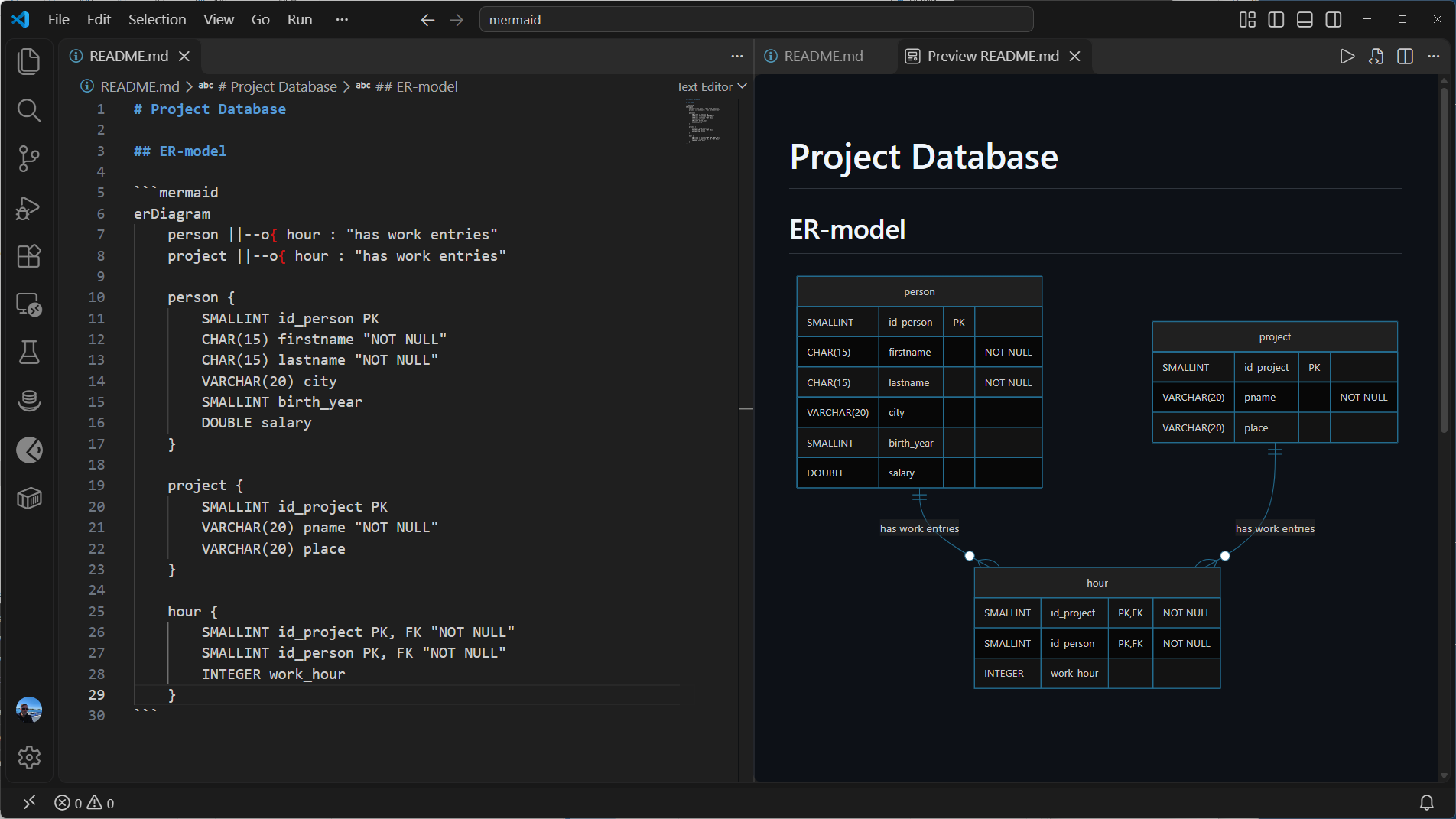
To embed a Mermaid diagram in a Markdown file, such as README.md,
place the diagram code inside a fenced code block. Start the block with three backticks
followed by mermaid (```mermaid), and end it with three backticks (```) on a separate line.
For an ER diagram, the first line inside the block is erDiagram, followed by the relationships and table definitions.
The screenshot below shows the Markdown source on the left and VS Code's Markdown preview on the right. The Markdown preview is built into VS Code. Since version 1.121, it also includes Mermaid support, so no additional extensions are needed to render the code block as an ER diagram. Open the preview beside the editor to see the diagram while editing its source.